 Braid for Androidthe phone companion
Your phone, as a second internet connection.
Braid on your laptop downloads over its own Wi-Fi and your phone’s 5G at the same time. This app is the phone half: it lends your mobile data, safely, and only when you say so.
- Android
- 8.0+
- Version
- 0.1.1
- Download
- 511 KiB
- Architectures
- one APK
- Written in
- Kotlin
Three ways a phone joins in.
Braid does the downloading. The phone is one more road to the internet, and it shows up in Braid’s sidebar with its own speed.
- Phone mobile data
- Phone Wi-Fi: not used, same exit as yours
- Wi-Fi
Your connection plus the phone's mobile data.
A phone on your Wi-Fi reaches the internet through your router, so its Wi-Fi is your own connection under a second name. Braid compares the address each path leaves from and marks that one Not used. The mobile data is a real second road.
Needs Braid for Android on the phone.
Pair in under a minute.
No typing, and no network discovery to fail. If there is no camera handy, Braid can scan for the phone instead, and you allow the request on the phone.
What it promises.
Real extra bandwidth
Mobile data and Wi-Fi are separate lanes, each pinned to its own network. Braid splits every download across them by measured speed and moves work off a lane that stalls.
It never fakes a path
A lane that says 5G leaves over 5G or refuses. It never slips back to Wi-Fi, because that is the one failure your computer could not detect.
Files arrive exactly right
Bytes pass through untouched: no compression, no caching, no retries. Braid checks every chunk on the computer, so a file is either correct or re-fetched.
Only on your terms
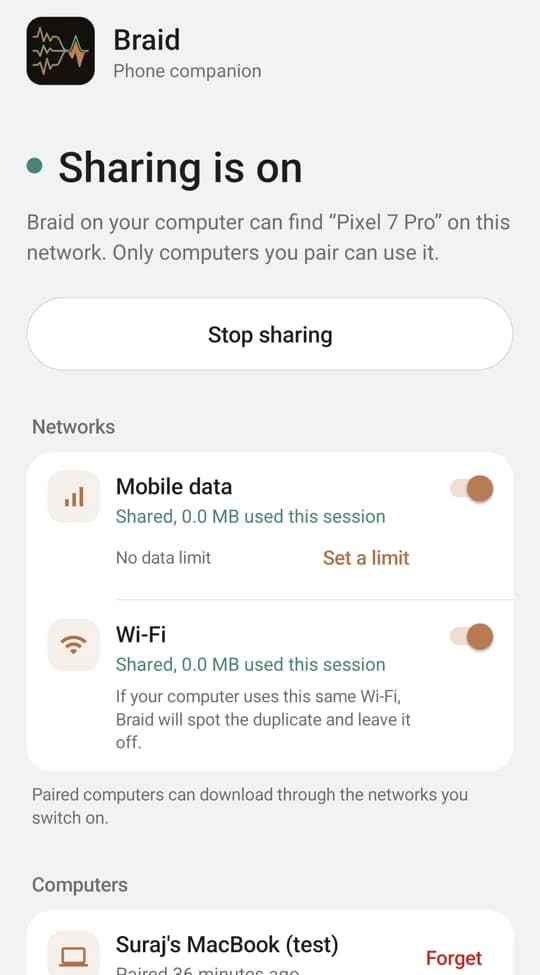
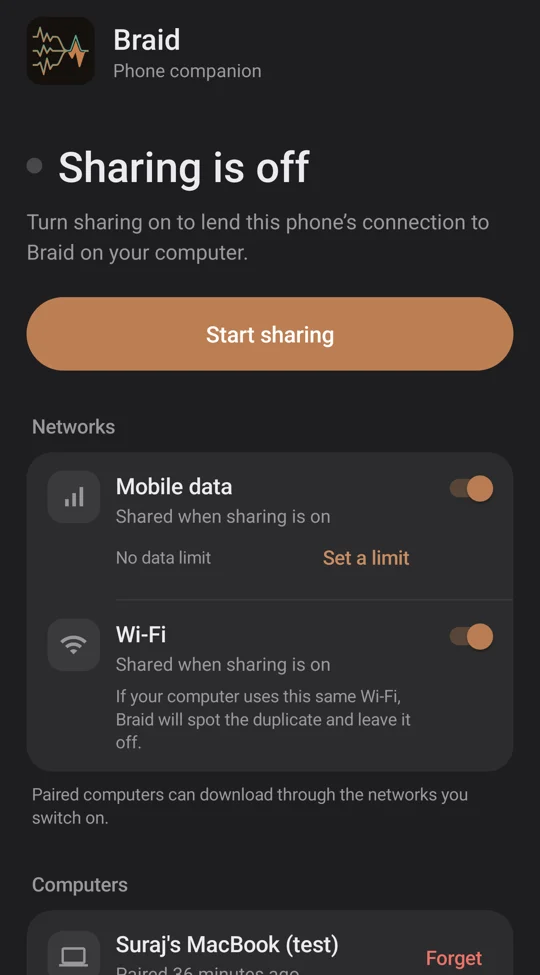
Nothing is shared until you pair and switch a network on. Codes only work for computers on your own network, keys are stored as hashes, and Forget cuts a computer off at once.
You see what it costs
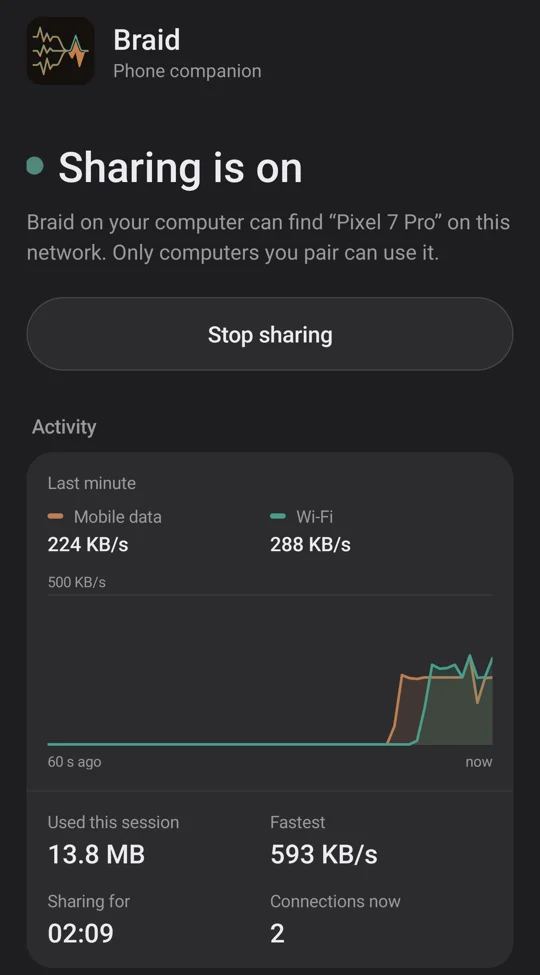
Live speed per network, data used this session, and an optional mobile-data limit that stops sharing when it is reached. It keeps going with the screen off.
Small, and nothing else leaves
One small APK with no native code, so the same file runs on every phone. No accounts, no analytics, no location permission.
The screens.
Captured on a Pixel 7 Pro on Jio 5G, in both themes. The paired computer and the traffic in the chart are test ones, sent through the phone with curl so the chart had something to show.
How it works.
The phone runs a small HTTP proxy. Every request from Braid names the network to use and carries the key from pairing. The phone sends it out exactly that network, or answers that it cannot, so Braid moves the work elsewhere. It never guesses.
Bytes come in over mobile data and go straight on to the computer. Nothing is stored on the phone, and every hard problem, checking, resuming, reassembling, stays on the desktop where it is already solved.
Your data, your plan.
Everything that passes through comes out of your data plan, so the phone decides. Networks are off until you switch them on, the limit stops sharing when it is reached, and the notification always shows what has been used. Some carriers restrict tethering in their terms, so check yours.
While sharing, the phone asks api.ipify.org for each network’s public address, so Braid can tell a real second path from a duplicate, and announces itself on your local network. Nothing else leaves the phone.
Install it.
Download braid-android-0.1.1.apk and open it on your phone. The first time, Android asks you to allow installs from your browser or file manager. The same APK runs on every processor, from a 2017 Galaxy to a Chromebook, because it carries no native code.
- Needs Android 8.0 or newer, and Braid on your computer.
- Signed with InfoDive Labs’ release key. Every release carries the same certificate; check it with
apksigner verify --print-certsagainst the fingerprint in the docs. - Not on Google Play yet. The APK is distributed directly for now.
- Tested on one phone and one carrier so far: a Pixel 7 Pro on Jio, which is IPv6-only. Other makers and carriers have not been tried.