Before you start
The current release is Trinetra 0.5.0, published on the releases page. You need:
- A Linux server with systemd. Ubuntu, Debian, Raspberry Pi OS, Fedora, RHEL, CentOS and almost every mainstream distribution. There are no macOS, Windows or container builds.
- Root. The service runs as root so it can read every container and
process, pull SMART data off the disks and start at boot. You run the install
with
sudo. - A Telegram bot token. Message @BotFather on Telegram, send
/newbot, follow the prompts and copy the token. It is the only setting Trinetra cannot do without. Every other setting already works as it is.
Two things are optional and picked up on their own when present:
- Docker. Every container becomes a monitored target with nothing to set.
- smartmontools. Install it (
sudo apt install smartmontoolsor your distribution's equivalent) for SMART disk health.
A release has three programs. trinetra is the daemon and the command line.
trinetra-web is the web UI and trinetra-ctl the terminal UI. Both are
optional plugins, so leave them out if Telegram is all you want.
Install
1. Download for your architecture
Pick the architecture of the server, not of the computer you are reading this
on. If you are not sure, the last tab tells you how to check. The commands keep
each program's name without its architecture suffix, so install finds the
plugins beside the daemon.
Servers, virtual machines, NUCs and most cloud instances.
mkdir -p ~/trinetra-download && cd ~/trinetra-download && arch=linux-amd64
for b in trinetra trinetra-ctl trinetra-web; do
  curl -fsSL -o "$b" "https://github.com/InfoDiveLabs/trinetra/releases/latest/download/$b-$arch"
done
for f in manifest.json manifest.ci.sig manifest.maint.sig; do
  curl -fsSL -o "$f" "https://github.com/InfoDiveLabs/trinetra/releases/latest/download/$f"
done
chmod +x trinetra trinetra-ctl trinetra-webRaspberry Pi 3, 4 and 5 on a 64-bit OS, and ARM cloud servers such as AWS Graviton or Ampere.
mkdir -p ~/trinetra-download && cd ~/trinetra-download && arch=linux-arm64
for b in trinetra trinetra-ctl trinetra-web; do
  curl -fsSL -o "$b" "https://github.com/InfoDiveLabs/trinetra/releases/latest/download/$b-$arch"
done
for f in manifest.json manifest.ci.sig manifest.maint.sig; do
  curl -fsSL -o "$f" "https://github.com/InfoDiveLabs/trinetra/releases/latest/download/$f"
done
chmod +x trinetra trinetra-ctl trinetra-webOlder 32-bit Raspberry Pi OS and other ARMv7 boards.
mkdir -p ~/trinetra-download && cd ~/trinetra-download && arch=linux-arm
for b in trinetra trinetra-ctl trinetra-web; do
  curl -fsSL -o "$b" "https://github.com/InfoDiveLabs/trinetra/releases/latest/download/$b-$arch"
done
for f in manifest.json manifest.ci.sig manifest.maint.sig; do
  curl -fsSL -o "$f" "https://github.com/InfoDiveLabs/trinetra/releases/latest/download/$f"
done
chmod +x trinetra trinetra-ctl trinetra-webRun this on the server:
uname -m| It prints | Use the tab | Release files end in |
|---|---|---|
x86_64 | x86-64 | -linux-amd64 |
aarch64 or arm64 | ARM64 | -linux-arm64 |
armv7l | ARMv7 | -linux-arm |
The binaries are static, so this one command is the whole answer, whatever the board or distribution.
manifest.json lists every file in the release with its exact size and
SHA-256. manifest.ci.sig is the build pipeline's signature over it and
manifest.maint.sig a maintainer's separate, offline one. Keep all three next
to the binaries.
2. Install the service
sudo ./trinetra install --require-signedThis checks both signatures against the keys compiled into the binary you are running and every binary's hash against the manifest, and refuses before copying anything if either fails. Then it:
- copies
trinetra, and whichever plugins sit beside it, to/usr/local/bin, with a link at/usr/bin/trinetrasosudo trinetraworks on distributions whosesecure_pathleaves out/usr/local/bin; - records each plugin's SHA-256, so the daemon refuses to run a plugin that has changed since;
- writes and enables
trinetra.service, with a systemd watchdog that restarts the daemon if its sampling loop ever stalls; - creates
/etc/trinetra/config.json, readable by root only, unless one exists already; - installs the safety net that lets updates roll back, and starts the service.
Only run install from a directory you control. It trusts the plugins it finds
beside the daemon, so never run it from /tmp or another shared directory.
3. Check what it can see
sudo trinetra doctordocker: available=true method=sudo
smartctl: ok
thermal zones: 2
targets discovered: 14
collectors: container_stats=on net_throughput=on services=on processes=on smart_attrs=on
time-series: 14 series, 2.3 MB on disk (raw+1m)Anything the host does not have shows as unavailable and is skipped, never a
crash. sudo trinetra monitor list shows every discovered target with its
threshold.
Verify a download yourself
install --require-signed already does this. To check a release without
trusting Trinetra at all, you need sha256sum and OpenSSL 3. macOS ships
LibreSSL, which cannot verify Ed25519: install openssl@3 with Homebrew there.
Keep the release's own file names while you verify.
mkdir trinetra-release && cd trinetra-release && arch=linux-amd64
base=https://github.com/InfoDiveLabs/trinetra/releases/latest/download
for f in trinetra-$arch trinetra-ctl-$arch trinetra-web-$arch \
         manifest.json manifest.ci.sig manifest.maint.sig; do
  curl -fsSL -o "$f" "$base/$f"
donemkdir trinetra-release && cd trinetra-release && arch=linux-arm64
base=https://github.com/InfoDiveLabs/trinetra/releases/latest/download
for f in trinetra-$arch trinetra-ctl-$arch trinetra-web-$arch \
manifest.json manifest.ci.sig manifest.maint.sig; do
curl -fsSL -o "$f" "$base/$f"
donemkdir trinetra-release && cd trinetra-release && arch=linux-arm
base=https://github.com/InfoDiveLabs/trinetra/releases/latest/download
for f in trinetra-$arch trinetra-ctl-$arch trinetra-web-$arch \
manifest.json manifest.ci.sig manifest.maint.sig; do
curl -fsSL -o "$f" "$base/$f"
doneRun uname -m on the server. x86_64 is x86-64, aarch64 is ARM64 and
armv7l is ARMv7.
Check the binaries against the manifest. Every file must print OK.
awk -F'"' '/"name":/ {n=$4} /"sha256":/ {print $4 " " n}' manifest.json | sha256sum -c --ignore-missingCheck that the manifest is genuine. Both signatures cover the line
trinetra-release-v1, one newline, then the manifest byte for byte:
{ printf 'trinetra-release-v1\n'; cat manifest.json; } > signed-message.bin
openssl base64 -d -A -in manifest.ci.sig    -out ci.sig.bin
openssl base64 -d -A -in manifest.maint.sig -out maint.sig.bin

pem() { printf '%s\n' '-----BEGIN PUBLIC KEY-----' "MCowBQYDK2VwAyEA$1" '-----END PUBLIC KEY-----'; }
pem 'qYrzYRct8xy9iJR6Xm8ow+u33GMc8fAoqaX9GZh4+N4=' > ci-current.pem
pem 'CCoIiySogUWY6OFBHGFfRTGFDOnUp+teJKY/Dxh1uaQ=' > maint-current.pem

openssl pkeyutl -verify -pubin -inkey ci-current.pem    -rawin -in signed-message.bin -sigfile ci.sig.bin
openssl pkeyutl -verify -pubin -inkey maint-current.pem -rawin -in signed-message.bin -sigfile maint.sig.binEach must print Signature Verified Successfully. The release is genuine only
when both pass. A release made after a key rotation is signed with a role's
next key instead. Those keys, and the fingerprints of all six, are in the
handbook's security chapter.
Then drop the suffixes and install as usual:
for b in trinetra trinetra-ctl trinetra-web; do mv "$b-$arch" "$b"; done
chmod +x trinetra trinetra-ctl trinetra-web
sudo ./trinetra install --require-signedConnect Telegram
The guided way is the terminal UI, which asks for the token and shows the PIN:
sudo trinetra cliOr with one command:
sudo trinetra telegram set-token 123456789:AAExampleTokenStringFromBotFatherTelegram token saved. To finish enrollment, from your Telegram account message the bot:
/start 123456Until you do that, the bot answers nobody. Send it /start followed by your
six-digit PIN, and that chat becomes the only one it answers. A plain message,
or /start with no PIN, does not claim it. After five wrong PINs it ignores
/start for a minute and picks a new PIN.
If set-token could not reach the daemon, read the PIN from the journal:
sudo journalctl -u trinetra | grep "/start"Then send the bot /stats. You should get CPU, memory, swap, load,
temperature, reachability and disk usage back. /help lists everything else it
answers.
Turn on the web UI
The web UI needs trinetra-web installed beside the daemon. The easiest way to
set it up is the wizard in the terminal UI: run sudo trinetra cli and press
s. It sets the serving mode and the passkey settings together, checks them and
applies them.
Do not only switch web.enabled on. Without a serving mode and a passkey
identity, registration and sign-in fail. Pick how the UI will be reached:
The default. The UI listens on 127.0.0.1:8088 and nginx, Caddy or a
Cloudflare Tunnel in front of it handles HTTPS. Keep it on loopback: the
forwarded headers are trusted only there.
sudo trinetra config set web.mode proxy
sudo trinetra config set web.listen 127.0.0.1:8088
sudo trinetra config set web.enabled true
sudo systemctl restart trinetraThe UI gets and renews a Let's Encrypt certificate itself. Port 80 must be free and reachable for the challenge.
sudo trinetra config set web.mode autocert
sudo trinetra config set web.listen :443
sudo trinetra config set web.autocert_domains monitor.example.com
sudo trinetra config set web.rp_id monitor.example.com
sudo trinetra config set web.origin https://monitor.example.com
sudo trinetra config set web.enabled true
sudo systemctl restart trinetraFor an internal CA or a wildcard certificate you already manage.
sudo trinetra config set web.mode manual
sudo trinetra config set web.listen :443
sudo trinetra config set web.tls_cert /etc/trinetra/tls/fullchain.pem
sudo trinetra config set web.tls_key  /etc/trinetra/tls/privkey.pem
sudo trinetra config set web.rp_id monitor.example.com
sudo trinetra config set web.origin https://monitor.example.com
sudo trinetra config set web.enabled true
sudo systemctl restart trinetraThe web.* settings take effect on a restart. A web setting that is wrong
stops the web UI from starting, never the monitoring: the reason is in
journalctl -u trinetra.
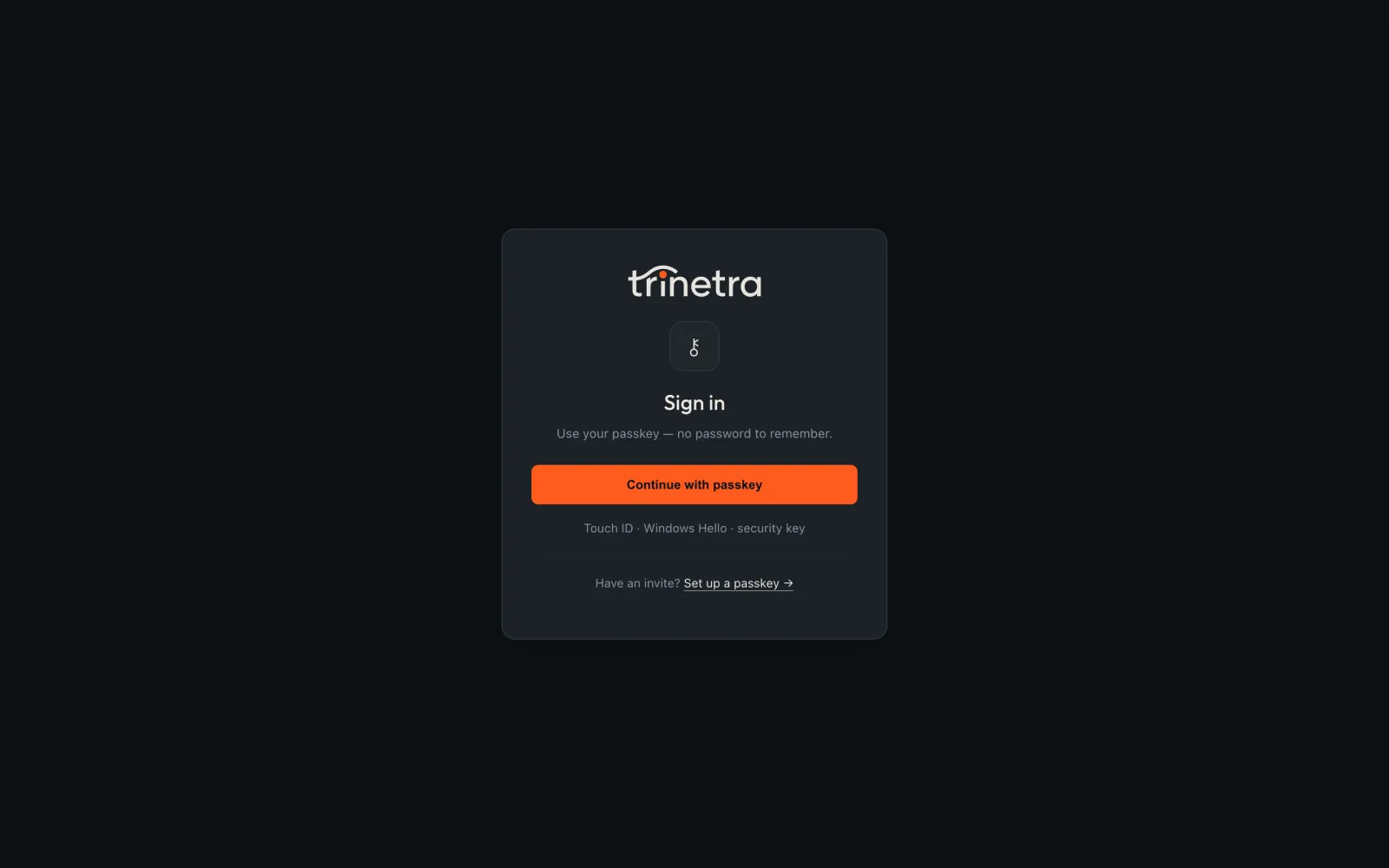
The first account. Open /enroll and register a passkey. The first one
becomes the admin, and from then on /enroll needs an invite: an admin creates
one on /users, choosing the role and how long the link lasts. A viewer can
read everything and change nothing.
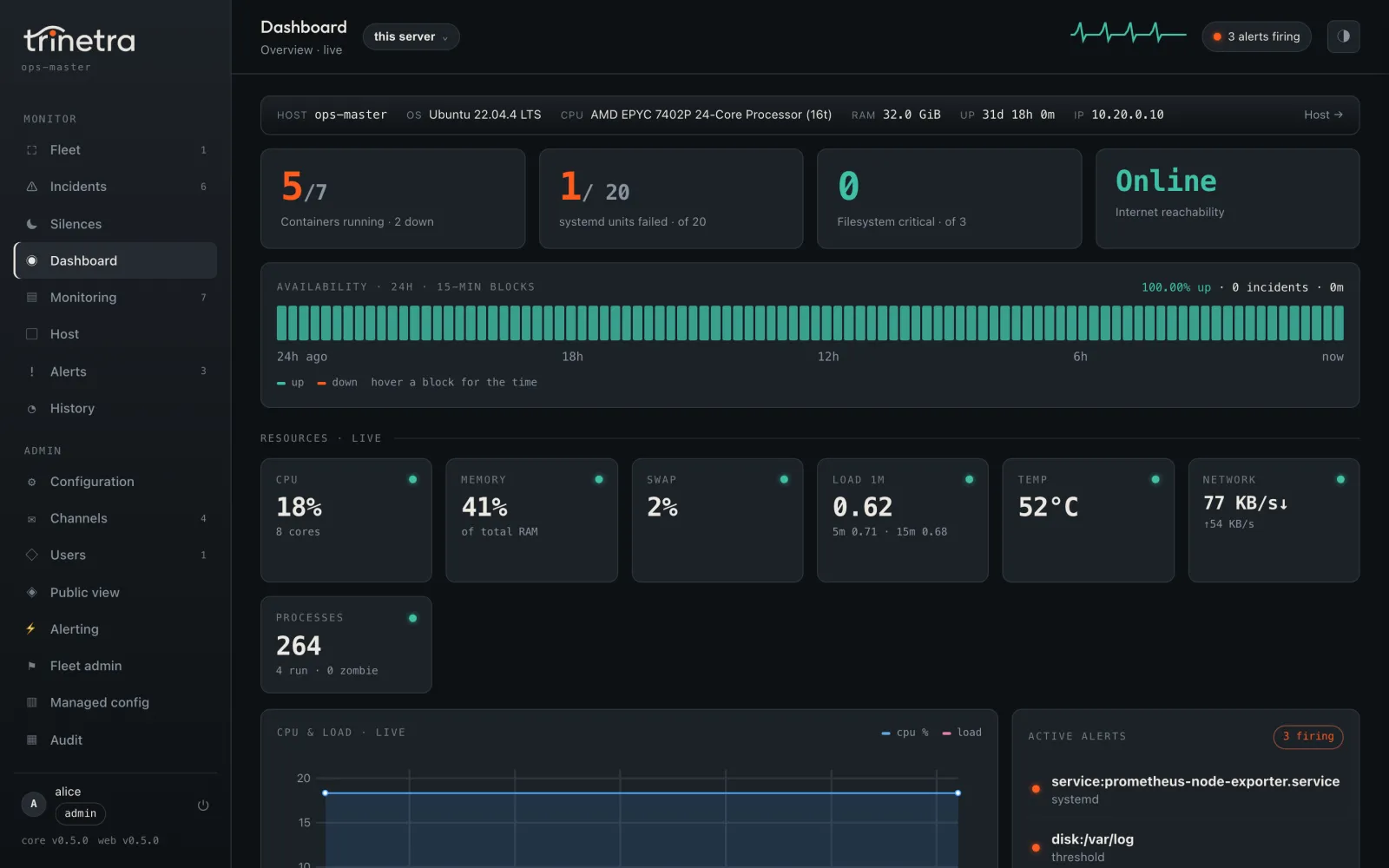
A public status page. Off by default. Only the panels you list appear, and the check happens on the server:
sudo trinetra config set public.enabled true
sudo trinetra config set public.panels availability,cpu,mem,disk:/,uptimeAlerts and channels
Trinetra compares CPU, memory, swap, temperature and every filesystem against a threshold, and alerts on a container that stops, a systemd unit that fails and a disk whose SMART health reports failure. It sends one message when a check starts firing and one when it clears.
sudo trinetra config set thresholds.disk_pct 85    # every filesystem
sudo trinetra monitor threshold disk:/boot 70      # just this one
sudo trinetra monitor disable docker:noisy-worker  # stop watching a target
sudo trinetra config set baseline_alerts true # also alert on "not normal for this box"| Setting | Default |
|---|---|
thresholds.cpu_pct | 95 |
thresholds.mem_pct | 90 |
thresholds.disk_pct | 90 |
thresholds.swap_pct | 50 |
thresholds.temp_c | 80 |
baseline_alerts | false |
baseline_sigma | 3 |
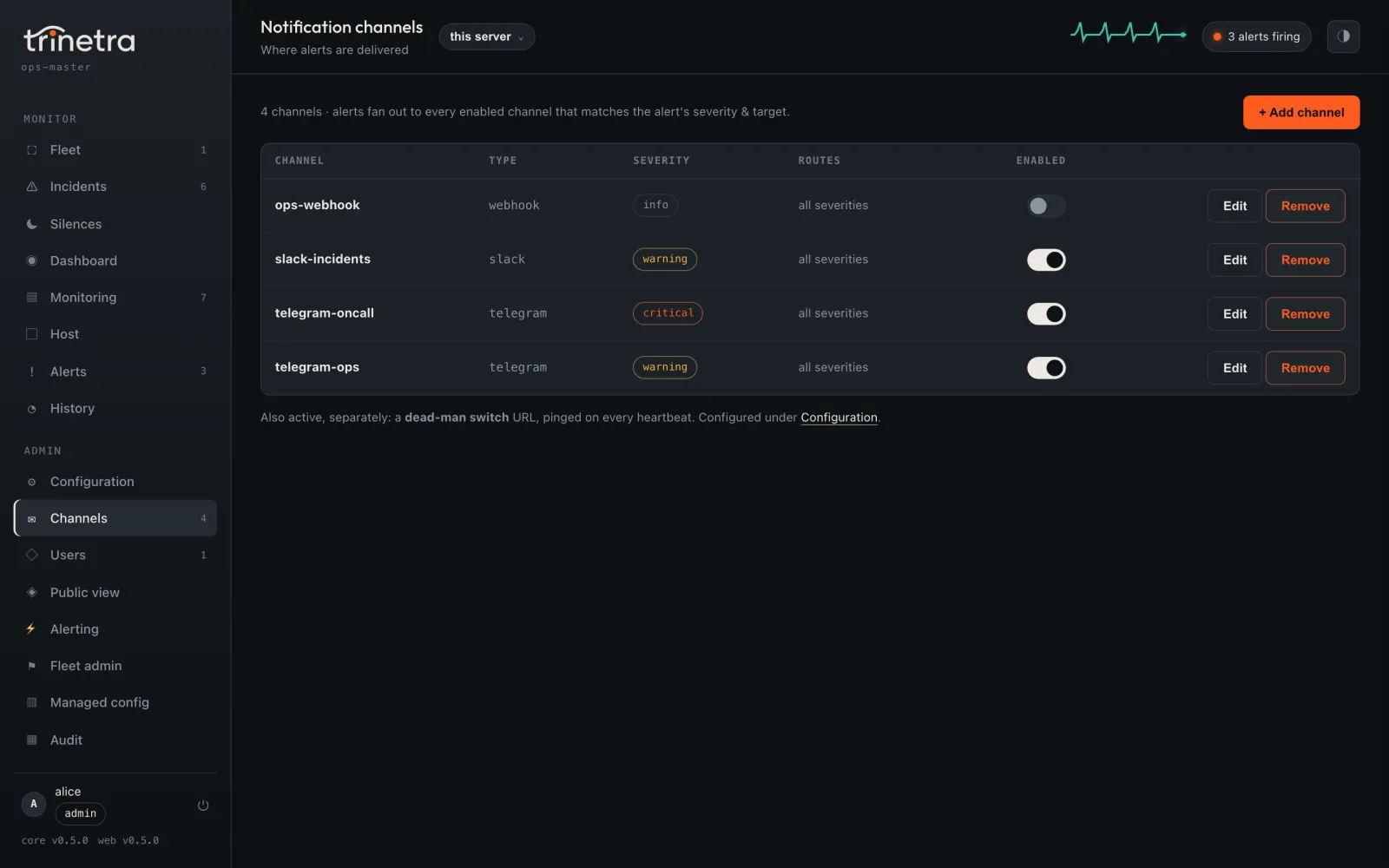
More channels. Telegram is one of seven: email, webhook, Slack, Discord, ntfy and Gotify are the others. Each has its own severity floor and its own quiet-hours rule. The terminal UI's Channels screen tests a channel before it saves it. From the command line:
sudo trinetra channel add ops-email --type email
sudo trinetra channel set ops-email setting.host smtp.example.com
sudo trinetra channel set ops-email setting.from trinetra@example.com
sudo trinetra channel set ops-email setting.to ops@example.com
sudo trinetra channel set ops-email min_severity critical
sudo trinetra channel test ops-email| Type | Required settings |
|---|---|
telegram | chat_id; the bot token falls back to the one from telegram set-token |
email | host, from, to; port defaults to 587 with STARTTLS |
slack, discord | url, the incoming-webhook URL |
ntfy | topic; server defaults to https://ntfy.sh |
gotify | server, token |
webhook | url; an optional Go template shapes the body |
Saving a channel in the web UI does not test it yet. Use
sudo trinetra channel test <name> after adding one there.
Quiet hours and digests.
sudo trinetra quiet-hours 23-8          # a disk alert still gets through
sudo trinetra schedule daily 09:00
sudo trinetra schedule weekly mon@09:00While the box is off. Nothing on a server can tell you it has lost power. A healthchecks.io check can: Trinetra pings it, and healthchecks.io alerts you when the pings stop.
sudo trinetra healthchecks set https://hc-ping.com/your-check-uuidBuild a fleet
Make one host the master. --address is every name and address the children
will use to reach it, because its certificate is issued for exactly those:
sudo trinetra fleet init --address monitor.example.com,203.0.113.7
sudo systemctl restart trinetra
sudo trinetra fleet token create --tags prod --uses 3 --ttl 1hThe token command prints a join code that starts with swj1_ and the exact
line to run on each server:
sudo trinetra fleet join swj1_...
sudo systemctl restart trinetraBack on the master:
sudo trinetra fleet nodes --tag prodThe children reach the master on port 9443 over mutual TLS. Open it in the master's firewall, and forward it only at the TCP level: a proxy that terminates TLS in front of it would strip the client certificates. The join code pins the master's certificate authority, so a child refuses to talk to anything else.
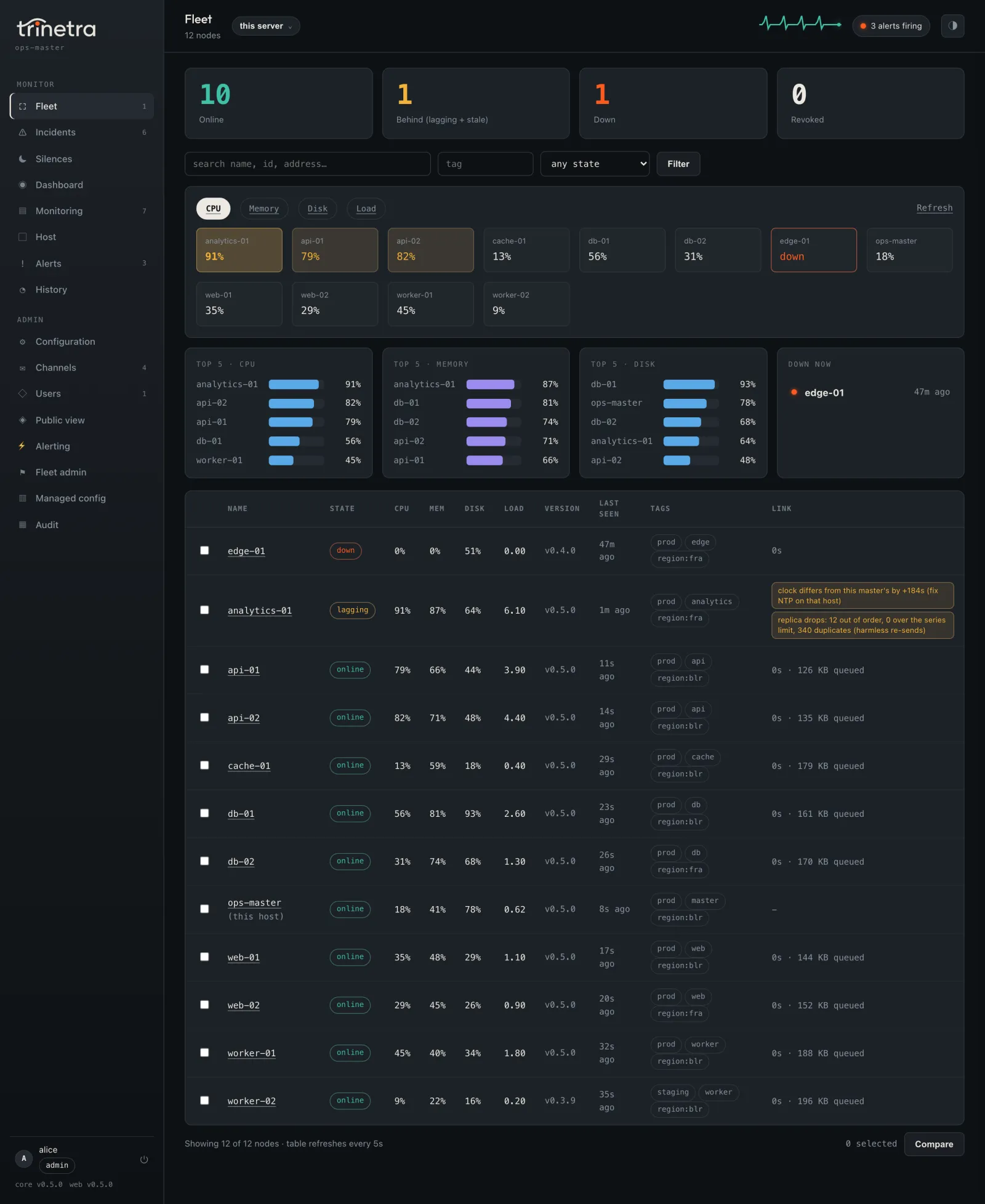
What changes on a child. Nothing it did alone stops. It still keeps its own
history and still detects its own alerts. It hands each alert to the master to
deliver, and delivers it itself, marked via local fallback: master unreachable,
if the master has not confirmed it within two minutes. Its history reaches the
master through an outbox on disk, 512 MB by default, so an outage only delays
it.
| Node state | Meaning |
|---|---|
online | In contact within the last 30 seconds |
lagging | In contact, but its oldest unsent data is over 5 minutes old or its clock is more than 30 seconds off |
stale | No contact for 30 seconds up to 2 minutes |
down | No contact for 2 minutes: raises an alert, and recovers it on return |
revoked | Cut off on purpose, and never alerts as down |
Removing a node. fleet node revoke on the master cuts a child off at once
and keeps its history. fleet leave on a child turns it back into a single
server, but the master is not told and keeps paging for it until you revoke or
remove it there.
Incidents, routing and silences
On the master, alerts from across the fleet become incidents. By default alerts with the same rule and severity share one, so ten web servers with the same problem page you once. When a node's upstream is down, its own down alert folds into the upstream's incident:
sudo trinetra fleet node depends api-01 db-01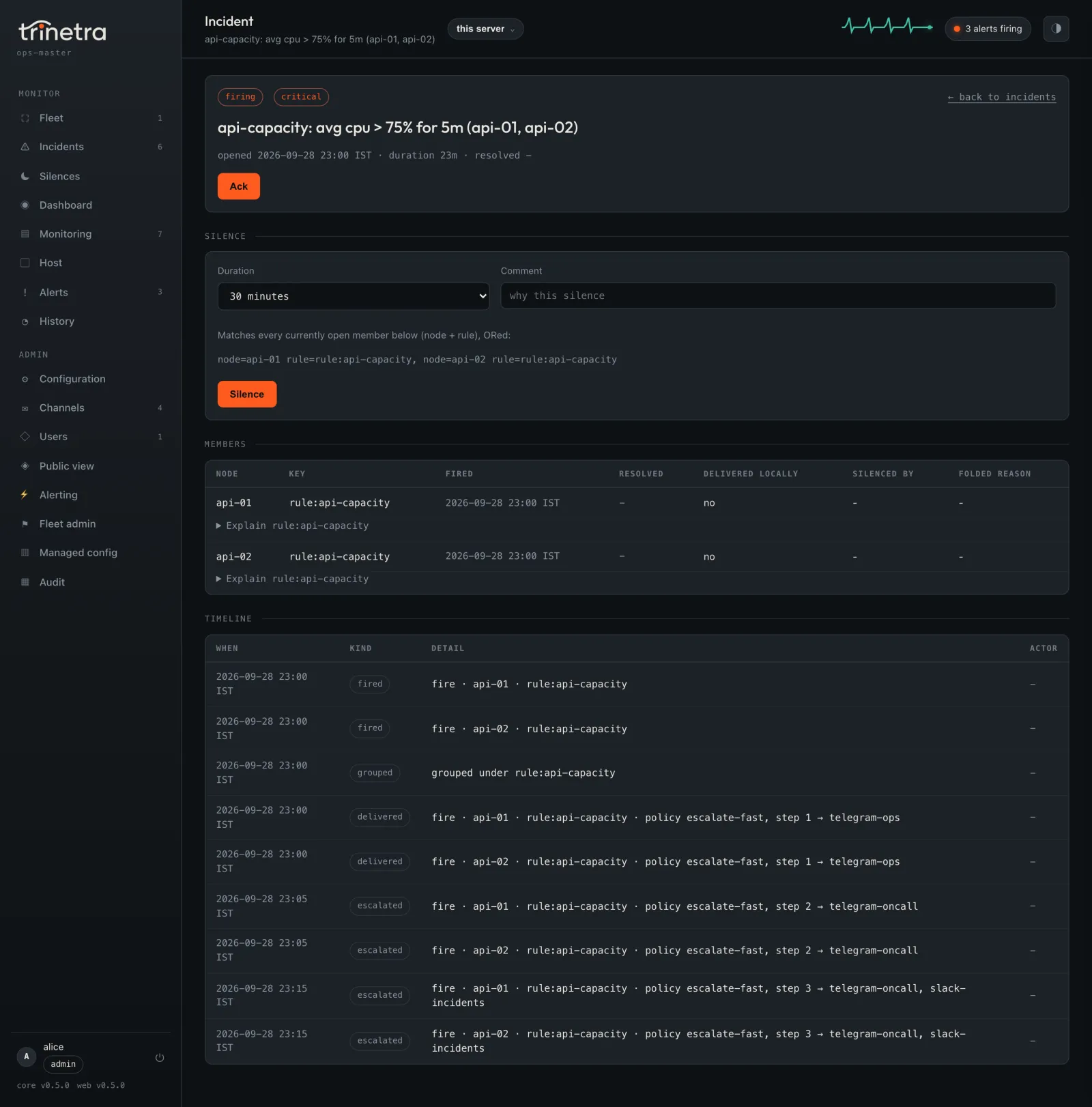
Acknowledge from the incident page, from the command line, or from Telegram with the Ack and Silence 1h buttons on the master's messages. To find out why an alert went where it did, or did not go anywhere:
sudo trinetra fleet incidents --state firing
sudo trinetra fleet ack 4f2a9c1b0d3e
sudo trinetra fleet explain 4f2a9c1b0d3eRoutes and escalation. A route matches tags, nodes, rules and severities
and picks a policy. A policy is a list of steps with a delay and the channels
for each. Edit both on /fleet/alerting, or as JSON, and try a made-up alert
before you save:
sudo trinetra fleet route test --node web1 --tag prod --rule cpu --severity critical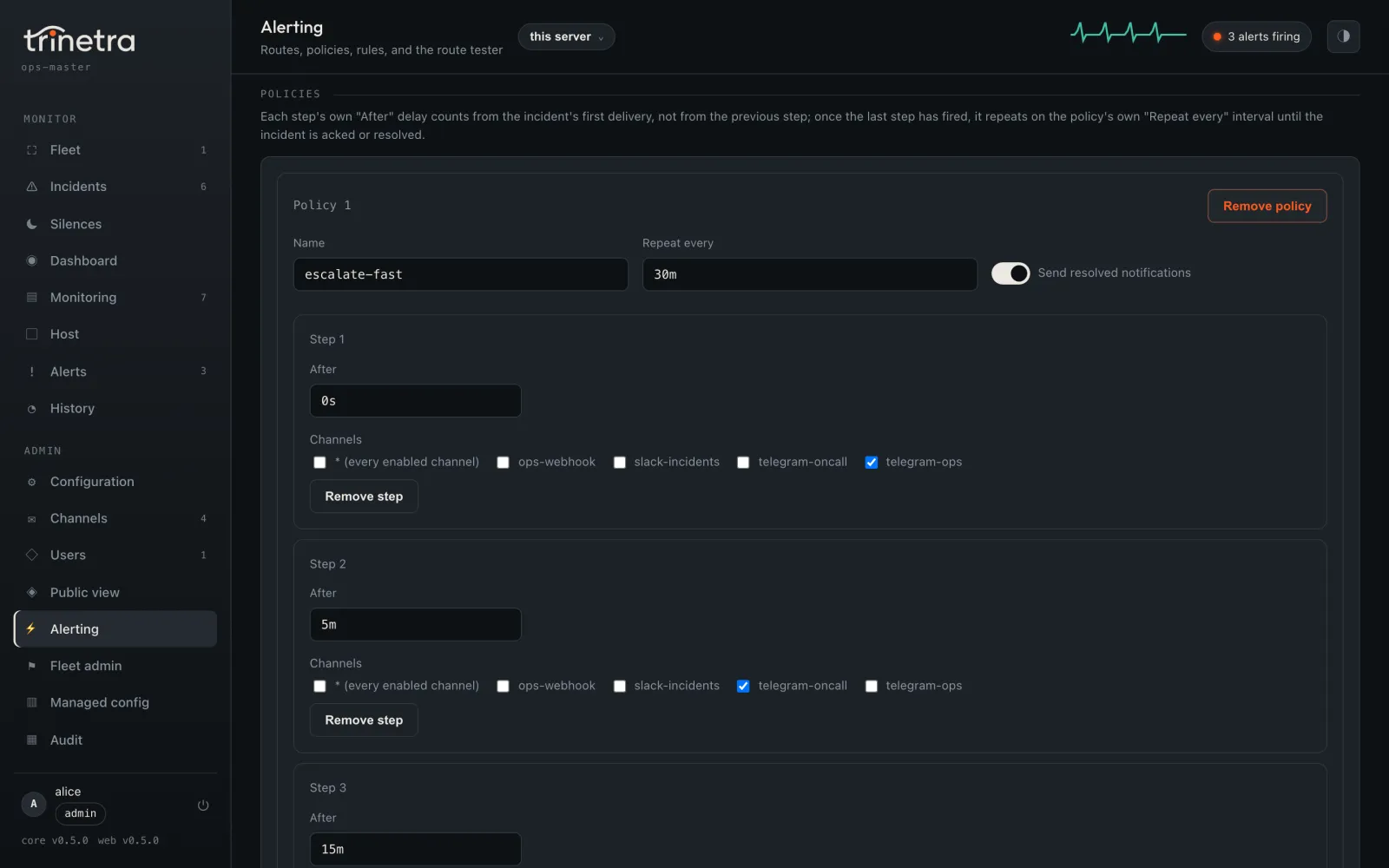
Silences and maintenance windows. A node= match uses the node's name, so
renaming the node breaks it. Match on a tag or the node's id if the silence has
to outlive a rename.
sudo trinetra fleet silence add --match tag=web,rule=cpu* --for 2h --comment "deploy"
sudo trinetra fleet maintenance add --name "weekly backup" \
--match tag=backup --days sat,sun --from 22:00 --to 02:00 --tz Asia/KolkataRules across the fleet. They run only on the master, every 30 seconds.
Selectors are tag:name, node:glob or all. Metrics are cpu, mem,
swap, disk, load1 and temp. for is required, with a one-minute
minimum.
count(tag:web, cpu > 90) >= 3 for 5m
avg(tag:db, mem) > 85 for 10m
online(tag:web) < 2 for 2m
absent(tag:backup, 15m)
Settings for a whole tier. The master can push thresholds, quiet hours and baseline settings to every node with a tag. On those nodes, a pushed setting is read-only.
sudo trinetra fleet managed set --tag web thresholds.cpu_pct=90
sudo trinetra fleet managed status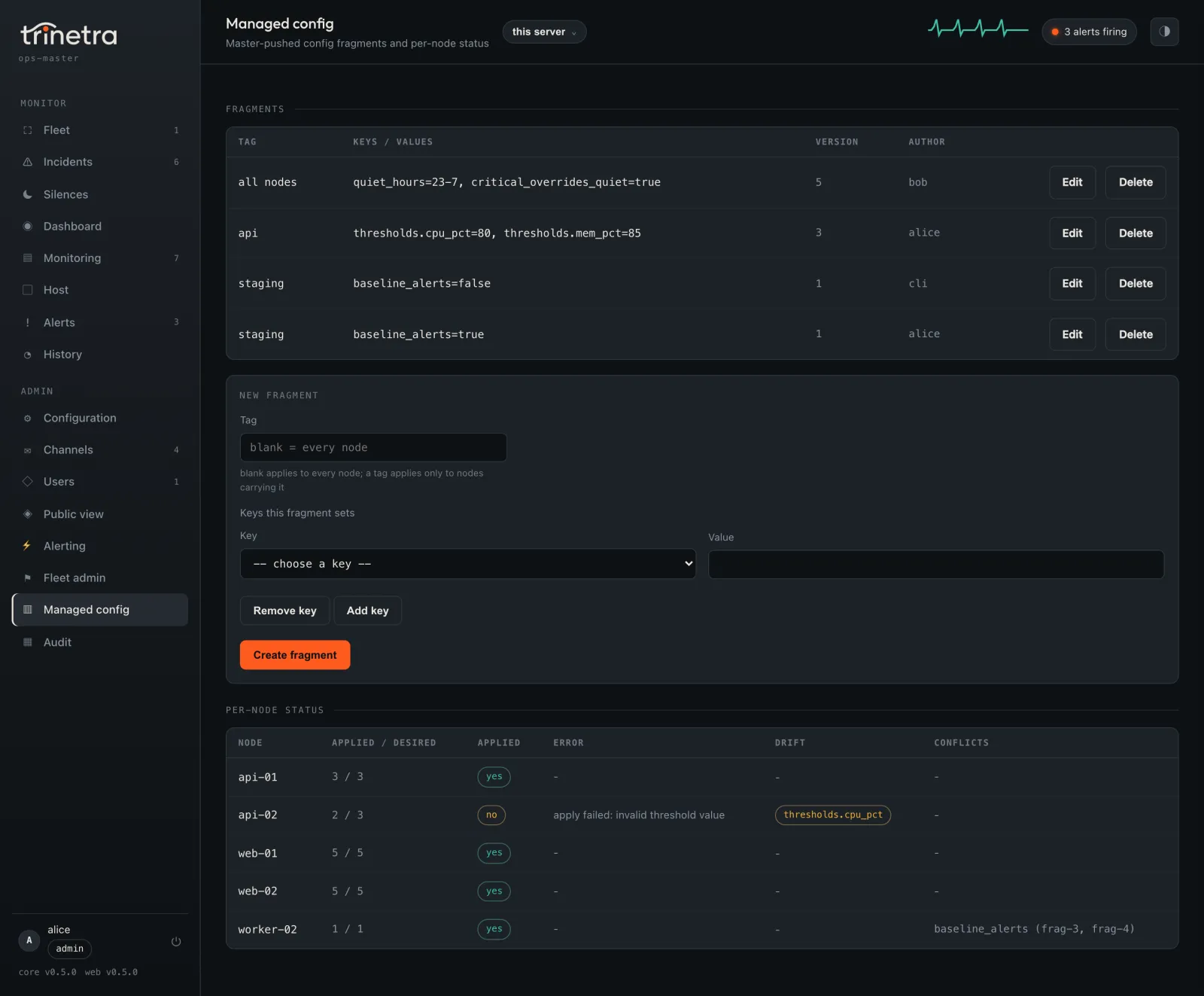
Update
sudo trinetra update check      # is there a newer release?
sudo trinetra update apply      # fetch, verify, install and guard it
trinetra update status          # what is running, what is pending, what happened last
sudo trinetra update rollback # back to the build beforeapply verifies both signatures and every hash before it touches anything,
refuses anything older than a version the host has run, and restarts under a
guard. If the new daemon is not healthy within 90 seconds, it goes back to the
previous build and marks the new one bad. A watchdog timer finishes that even
across a crash or a reboot.
The daemon checks for a release once a day and alerts you when one is out. It never installs one on its own. That check is the one outbound call you did not set up yourself. To turn it off:
sudo trinetra config set update.channel offupdate.channel can also be beta. Updates are per host for now: a fleet
master does not roll releases out to its children yet.
Upgrade from serverwatch
Trinetra is serverwatch renamed: same daemon, same data. Download trinetra
and the plugins you use into one directory, as in Install, and run
the same command:
sudo ./trinetra installIt stops serverwatch.service, moves /etc/serverwatch and
/var/lib/serverwatch to their Trinetra paths, and keeps config, history,
alert state, Telegram enrollment, passkeys and fleet identity. Nothing is
deleted before its replacement is proven in place, and a re-run after an
interruption picks up where it stopped. If anything looks wrong, such as data
under both names or a state directory that is empty, it refuses and says what
to check. The serverwatch command keeps working for one more release.
Include the plugins: an upgrade with the daemon alone leaves the web UI and
terminal UI down until you add them and run install again.
Day to day
systemctl status trinetra
journalctl -u trinetra -f
trinetra status
sudo trinetra config get
sudo trinetra alertsMost settings apply without a restart. storage.* and web.* need
sudo systemctl restart trinetra.
| Where | What |
|---|---|
/etc/trinetra/config.json | Every setting, readable by root only. Change it with trinetra config set, not an editor. |
/var/lib/trinetra | History, alert state, downtime, and fleet identity and replicas |
/run/trinetra/control.sock | The local socket the plugins use |
History keeps raw samples for 48 hours and one-minute rollups for 30 days:
sudo trinetra config set storage.rollup_retention 2160h   # 90 days
sudo systemctl restart trinetraUninstall
sudo trinetra uninstall           # keeps config and history
sudo trinetra uninstall --purge # deletes them too, secrets includedOn a fleet child, run sudo trinetra fleet leave first, then revoke or remove
the node on the master so it stops expecting it.
Troubleshooting
sudo trinetra says command not found. Some minimal and older RHEL-family
systems leave /usr/local/bin out of sudo's path, and the /usr/bin link could
not be made. Run sudo /usr/local/bin/trinetra install again to recreate it.
trinetra cli or trinetra web refuses, warning about tampering. The
plugin no longer matches the hash recorded at install. If you just replaced it
yourself, run sudo trinetra install to record the new one. If you did not,
find out what changed it before you do anything else.
Docker is not monitored. Run sudo trinetra doctor. If it says docker is
unavailable, make sure the Docker socket is reachable by root or that
sudo docker works without a password.
SMART shows nothing. Install smartmontools. Some disks and USB-to-SATA
bridges do not expose SMART at all, and those are skipped.
A child keeps showing as lagging. Its clock is probably more than 30 seconds off. Fix NTP on that host. A clock running ahead can make the master reject its data until it is corrected.
Why was I not paged? sudo trinetra fleet explain followed by the alert
key or incident id prints every step the alert took: silences, folds, grouping,
the route, the policy and each delivery.
Build from source
You need Go 1.22 or newer.
git clone https://github.com/InfoDiveLabs/trinetra.git
cd trinetra
make linux     # dist/trinetra-linux-amd64 and dist/trinetra-linux-arm64
GOOS=linux GOARCH=arm64 go build -o dist/trinetra-ctl-linux-arm64 ./cmd/trinetra-ctl
GOOS=linux GOARCH=arm64 go build -o dist/trinetra-web-linux-arm64 ./cmd/trinetra-webmake cross builds all three programs for every supported platform. Copy the
ones for your server into one directory without their suffixes and run
sudo ./trinetra install. A build of your own carries no release signatures,
so leave out --require-signed.
Licence
Trinetra is source-available under the Functional Source License 1.1, ALv2 Future License (FSL-1.1-ALv2), © 2026 InfoDive Labs Pvt Ltd.
- Free to use, self-host and change, for yourself or inside a company, commercially too, as long as it is not a competing product or service. Education, research and setting it up for a client are all allowed.
- Not allowed: selling or hosting Trinetra, or a product built on it, as a competing commercial offering.
- Becomes Apache-2.0 on the second anniversary of each release.
Releases up to v0.4.1, published as serverwatch, remain MIT.
Report a security problem through GitHub's private vulnerability reporting, not a public issue.